
If you want your orbital sander to work smoothly and last longer, knowing how to maintain it is key. You might think sanding is simple, but without proper care, your tool can lose power or even break down.
This guide will show you easy steps to keep your orbital sander in top shape. By following these tips, you’ll save time, avoid frustration, and get better results on every project. Ready to make your sander work like new every time?
Let’s dive in.
Choosing The Right Orbital Sander
Choosing the right orbital sander is important for smooth and effective sanding. The right tool saves time and effort. It also helps protect your work surface from damage. This guide explains the main types and key features to consider. It helps you pick the best sander for your needs.
Types Of Orbital Sanders
There are mainly three types of orbital sanders. Each type suits different projects and skill levels.
- Random Orbital Sander: Moves in a random pattern. Good for fine finishing and quick sanding.
- Finishing Orbital Sander: Has a smaller pad. Best for light sanding and detail work.
- Sheet Orbital Sander: Uses rectangular sandpaper sheets. Works well for flat surfaces.
Choosing the right type depends on your project size and surface type. Random orbital sanders are versatile for most tasks. Sheet sanders work better on large, flat areas. Finishing sanders fit small, delicate spots.
Key Features To Look For
Focus on these features to get a good orbital sander.
- Power: Higher power means faster sanding. Choose based on project size.
- Speed Control: Adjustable speed helps with different materials.
- Dust Collection: A good system keeps your workspace clean.
- Comfort: Look for a soft grip and lightweight design.
- Pad Size: Larger pads cover more area. Smaller pads allow more control.
These features improve efficiency and comfort. They also protect your project and workspace.
Regular Cleaning Practices
Regular cleaning keeps your orbital sander working well and lasting longer. Dirt and dust can build up quickly. This buildup can block air vents and reduce sanding power. Cleaning your tool often helps it run smoothly. It also prevents damage and costly repairs. Simple cleaning steps make a big difference in performance.
Removing Dust And Debris
Turn off and unplug the sander before cleaning. Use a soft brush or cloth to wipe away dust. Pay special attention to air vents and motor openings. Use compressed air to blow out hard-to-reach areas. Never let dust collect inside the tool. This can cause overheating and wear.
Cleaning The Sanding Pad
Remove the sanding pad from the sander carefully. Clear off any stuck debris or old sandpaper bits. Use a damp cloth to wipe the pad’s surface gently. Avoid soaking the pad to prevent damage. Check the pad for wear and replace if needed. A clean pad ensures smooth sanding and better results.
Inspecting And Replacing Parts
Inspecting and replacing parts is key to keeping your orbital sander working well. Regular checks stop small problems from becoming big ones. This helps your tool last longer and work better every time.
Checking The Sanding Discs
Look at the sanding discs before each use. Replace any that are worn, torn, or clogged. Worn discs reduce sanding quality and can damage surfaces. Changing discs often keeps your work smooth and clean.
Maintaining The Power Cord
Examine the power cord for cuts or frays. A damaged cord is unsafe and can cause electric shocks. Replace the cord if you find any damage. Always unplug the sander before checking the cord.
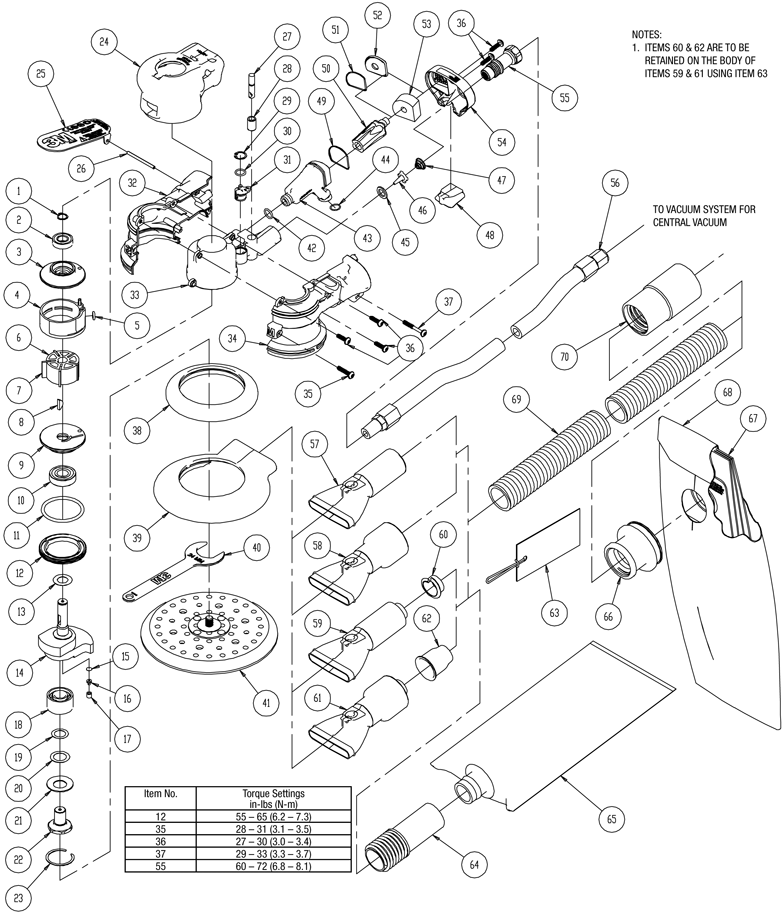
Lubricating Moving Components
Apply lubricant to the sander’s moving parts regularly. This lowers friction and prevents parts from wearing out fast. Use the lubricant recommended by the manufacturer. Proper lubrication keeps the sander running quietly and smoothly.
Credit: www.rshughes.com
Proper Storage Techniques
Proper storage techniques keep your orbital sander safe and in good shape. Storing it right helps avoid damage and extends its life. A clean, dry place is best for your tool. Take time to arrange your workspace for easy access and protection.
Avoiding Moisture Damage
Moisture can cause rust and damage the sander’s parts. Store the sander in a dry area with low humidity. Avoid damp basements or places near water. Use a sealed plastic case or toolbox to protect it from moisture. Wipe the sander dry before storage if it gets wet during use.
Organizing Your Workspace
Keep your workspace tidy to protect the orbital sander. Use shelves or hooks to store the sander off the ground. Store sanding pads and accessories nearby but separate to avoid mix-ups. Label storage spots to find items quickly. A neat area prevents accidents and tool damage.
Safe Usage Tips
Safe usage of an orbital sander protects both the user and the tool. Following simple tips can prevent accidents and damage. These tips help the sander work well for a long time.
Paying attention to how you handle the sander keeps it cool and efficient. Also, using the right pressure avoids wear and tear on the machine and the surface you are sanding.
Handling Overheating Issues
Overheating can harm the motor and reduce the sander’s life. Take breaks every few minutes to let the tool cool down. Avoid blocking the air vents during use. Clean dust and debris from vents regularly. Use the sander on smooth, even surfaces to prevent strain. Stop sanding if you smell burning or see smoke.
Using The Right Pressure
Pressing too hard can damage the sander and your workpiece. Let the sander’s weight do the work. Hold the tool firmly but gently. Applying light, steady pressure gives the best results. Too much force wears out the sandpaper fast. It can also cause uneven sanding and scratches. Adjust your grip to maintain control without pushing down hard.

Credit: ceramicprotricounty.com
Troubleshooting Common Problems
Orbital sanders are useful tools but can face issues during use. Troubleshooting these common problems helps keep your sander in good shape. Early detection prevents bigger damage and saves time.
Unusual Noises
Strange sounds often mean dirt or loose parts inside the sander. Stop using the tool immediately. Check the sanding pad and motor area for debris. Tighten any loose screws or parts. Clean the vents to avoid overheating. Persistent noise might need professional repair.
Loss Of Power
Power drops can come from worn brushes or electrical issues. Check the power cord for cuts or damage. Replace worn carbon brushes if your sander uses them. Test the outlet with another device to rule out power supply problems. Ensure the switch works properly. Persistent power loss means a technician should inspect the sander.
Uneven Sanding
Uneven sanding happens due to worn pads or poor technique. Replace sanding pads regularly for smooth results. Use the right grit for your project. Press lightly and keep the sander moving in small circles. Check for bent or damaged backing plates. Clean dust from the sanding surface often to avoid clogs.

Credit: mrsander.co.uk
Frequently Asked Questions
How Often Should I Clean My Orbital Sander?
Clean your orbital sander after every use. Remove dust and debris from vents and pads. This prevents clogging and extends tool life.
What Type Of Sandpaper Is Best For Orbital Sanders?
Use hook-and-loop sandpaper designed for orbital sanders. Choose grit based on your project, from coarse to fine. Proper sandpaper improves efficiency and finish quality.
How Do I Replace The Sanding Pad On An Orbital Sander?
Turn off and unplug the sander. Remove the old pad by detaching it carefully. Attach the new pad firmly to ensure proper sanding.
Can I Use An Orbital Sander On Different Surfaces?
Yes, orbital sanders work on wood, metal, and plastic. Use appropriate sandpaper grit for each surface. Always test on a small area first.
Conclusion
Regular care keeps your orbital sander working well. Clean the dust and check parts often. Change the sanding pads when worn out. Store it in a dry, safe place. These simple steps help your tool last longer. Save money by avoiding early repairs.
A well-kept sander gives smooth, even results. Keep your workspace tidy for better safety. Small efforts make big differences over time. Maintain your sander, and enjoy better projects every day.

Michael Harris is an experienced woodworker and power tool expert with over 12 years in woodworking. Specializing in functional, high-quality furniture, he offers expert advice on tool selection, maintenance, and sharpening for both beginners and professionals.